How to Activate Your ButterScroll License
Step-by-Step Activation Guide
1. Find ButterScroll in the System Tray
Look for the ButterScroll icon near the clock (bottom-right of your screen).
If you don’t see it, click the ▲ arrow to show hidden tray icons.
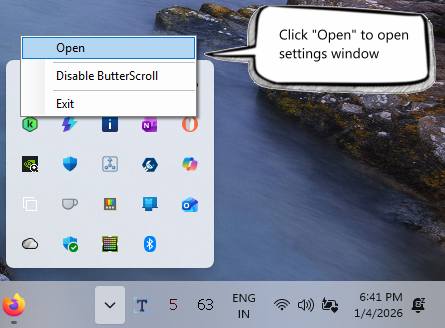
2. Open ButterScroll Settings
Right-click on the ButterScroll tray icon.
Click Open.
The Settings window will open.
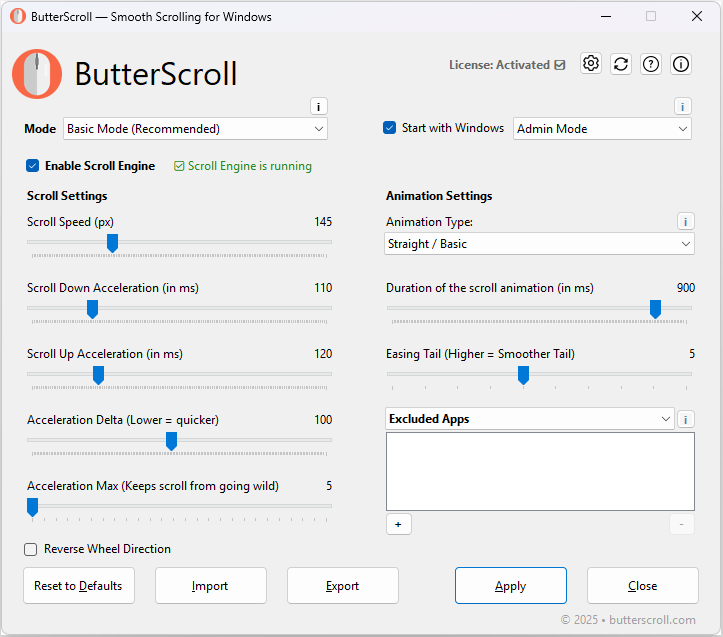
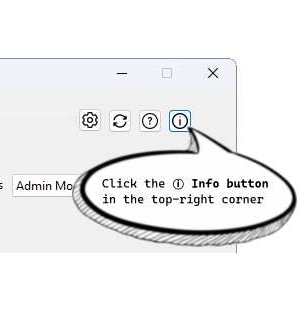
3. Open the About Window
In the top-right corner of the Settings window, click the ⓘ Info button.
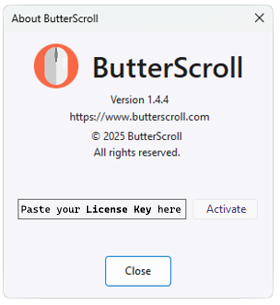
This will open the About window.
4. Enter Your License Key
Paste your License Key into the text box provided.
Click the Activate button.
Activation Complete 🎉
Once activated, ButterScroll will be licensed forever on this computer.
No subscriptions. No renewals.