Smooth scrolling on Windows just got better
Smooth scrolling for Windows is what ButterScroll is all about. It transforms jerky mouse scrolling into smooth, fluid motion with customizable speed and easing - just like scrolling on macOS.
Smooth Scrolling for Life — Special Offer: $2.99 (Regular $5)
Try ButterScroll — enable smooth scrolling system-wide, or only in the apps you choose.
Looking for smooth mouse scrolling in Windows? ButterScroll delivers exactly that.
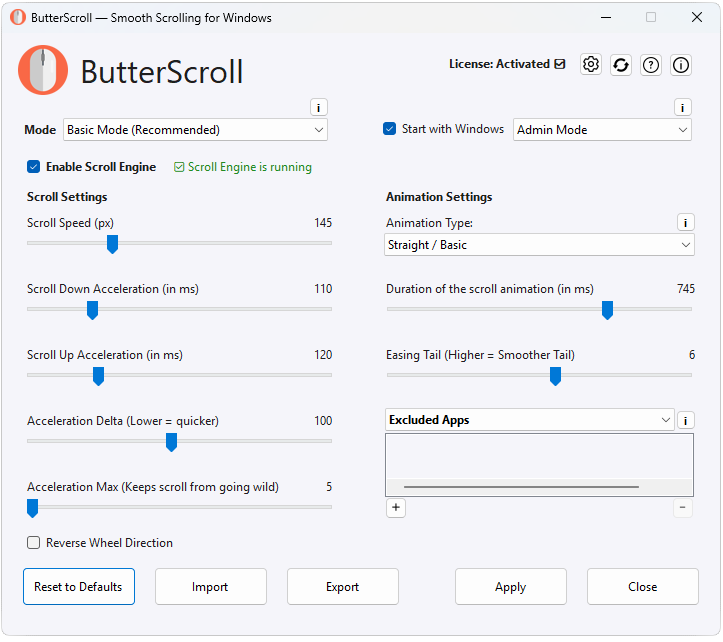
Smooth scrolling for all mice.
ButterScroll enhances your everyday scrolling experience with buttery-smooth scrolling precision, customizable control, and a satisfying feel across all your Windows apps — from browsers to spreadsheets.
Easy to set up and use
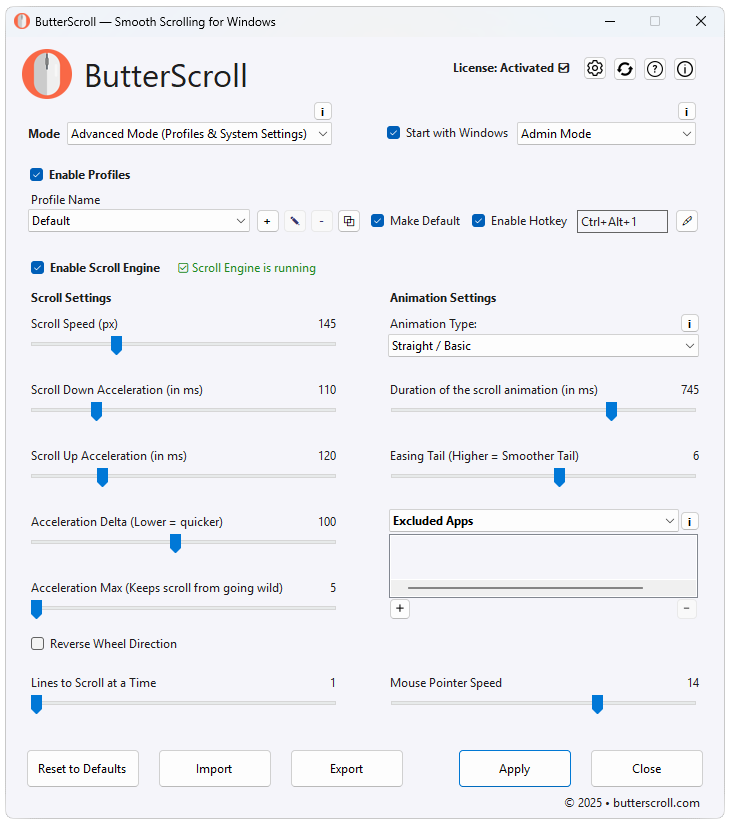
ButterScroll adds Mac-style smooth scrolling to Windows with profiles, hotkey switching, and per-profile system controls.
Smooth, fluid scroll animations for all apps.
Works with any mouse – no extra hardware needed.
Adjustable speed, acceleration, and easing.
Lightweight and optimized.
No tracking, no ads, full privacy control.
15-day free trial —Special Offer: $2.99 (Regular $5) lifetime license.

✨ Key Features of ButterScroll
Smooth Scrolling
Enjoy Mac-style smooth and fluid scrolling on Windows.
Adjustable Speed & Duration
Fine-tune how fast and how long each scroll feels.
Acceleration & Easing
Natural scroll curves that adapt to your movement.
Modes
Choose between Compact Mode (ready to use instantly) and Advanced Mode (for full control).
App-Specific Control (Included / Excluded Apps)
Enable smooth scrolling only in selected apps, or system-wide with optional exclusions.
Profiles
Save different scroll setups as profiles for each mouse or use case.
Easy Switching
Switch profiles instantly using a hotkey or the tray menu.
System Controls
Set Windows “lines to scroll” and mouse pointer speed individually per profile.
Normal Mode & Admin Mode
Use ButterScroll with normal permissions, or in Admin Mode to work with elevated apps like Task Manager, Visual Studio, and more (system restart required).
Works Everywhere
Compatible with browsers, Office apps, and most Windows programs.
See how ButterScroll compares
Here’s a quick comparison to help you choose the right one.
| Features | ButterScroll | Browser Addons | Free Tools | Other Paid Apps |
|---|---|---|---|---|
| Works in all apps Smooth scrolling across all apps – browsers, Excel, editors & more. |
✅ | ❌ (Browser only) |
⚠️ Limited |
✅ |
| Smoothness quality How smoothly works on each app. Natural, fluid scrolling with no jumps or sudden stops. |
⭐⭐⭐⭐ | ⭐⭐ | ⭐⭐ | ⭐⭐⭐ |
| Customization Fine-tune speed, acceleration, duration, and easing. |
✅ Full control |
❌ Very limited |
⚠️ Basic |
⚠️ Limited |
| Included / Excluded apps Choose exactly where smooth scrolling should work; In included apps only or systemwide with excluded apps. |
✅ | ❌ | ⚠️ Limited |
⚠️ Limited |
| Custom scroll lines control Choose how many lines to scroll for all apps, included apps, or excluded apps. |
✅ | ❌ | ❌ | ❌ |
| Light & Dark mode Switch between light and dark themes. |
✅ | ⚠️ Limited |
⚠️ Limited |
⚠️ Limited |
| No ads / tracking Clean experience — no ads, no hidden tracking. |
✅ No Ads/Tracking |
⚠️ Some addons track |
⚠️ Some apps track |
⚠️ Some apps track |
| Lightweight & optimized Minimal CPU usage, no slowdowns. Runs smoothly in the background without slowing your system. |
✅ | ⚠️ Limited |
⚠️ Limited |
⚠️ Limited |
| One-time payment Pay once, use forever. No subscription. |
✅ $2.99 |
⚠️ Mostly Free |
✅ Free |
❌ $5 or above |
Frequently Asked Questions
Here’s what our users ask most often.
What is ButterScroll?
ButterScroll is a lightweight Windows application that enhances your mouse scrolling experience, making it smoother and more responsive across all applications.
How do I install ButterScroll?
Simply download the installer from our website, run it, and follow the on-screen instructions. No additional setup is required.
Can I customize the scrolling behavior?
Yes! ButterScroll offers customizable settings, allowing you to adjust scroll speed, acceleration, and other preferences to suit your needs.
Is ButterScroll compatible with all applications?
ButterScroll is designed to work seamlessly with most Windows applications. However, if you encounter any compatibility issues, you can disable ButterScroll for specific apps through the settings.
Can I enable smooth scrolling only in specific apps?
Yes. ButterScroll supports smooth scrolling only in selected apps or smooth scrolling everywhere except selected apps
Should I change my Windows scroll setting for better smoothness?
Yes! For the best ButterScroll experience, we recommend setting “Lines to scroll at a time” to 1 in your Windows Mouse settings. This gives ButterScroll finer control over scrolling, making it feel smoother and more natural.
You can find this setting in:
Settings - Bluetooth & devices - Mouse
or
Control Panel - Mouse - Wheel tab
Does ButterScroll collect any personal data?
No. ButterScroll respects your privacy and does not collect or transmit any personal data. All settings are stored locally on your device.
What happens after the free trial ends?
After the 15-day free trial, you'll need to purchase a license to continue using ButterScroll. We offer a one-time payment option for lifetime access.
New to ButterScroll?
Learn how to get the smoothest scrolling experience with our Step-by-Step Tutorial.
Still have a question? Ask your question here
We don’t share your personal information with anyone. Check out our Privacy Policy for more information.